



Managing documentation for Durable Medical Equipment (DME) is a cornerstone of compliance, billing accuracy, and readiness. From 2026 onward, a good documentation system isn’t just a nice extra — it’s what keeps you accredited, audit-ready, and getting paid on time
This article walks through exactly how to design and implement a practical, end‑to‑end documentation workflow for DME that minimizes risk and maximizes efficiency, with tips you can use right away.
- Capturing the right information at intake prevents errors and reduces claim denials later
- A centralized system with clear naming and checklists makes retrieving and reviewing records quick and easy
- Regular internal audits and staff training turn your workflow from a compliance chore into a strategic advantage
Why Documentation System Matters in DME
Every claim you submit for DME equipment (whether it’s a wheelchair, CPAP, or diabetic supplies) must be supported by documentation that meets Medicare’s standards. CMS and Medicare Administrative Contractors (DME MACs) expect documentation to clearly show medical necessity and must include things like a valid written order, clinician information, and other patient‑specific details.
When documentation is incomplete, unorganized, or hard to find, it doesn’t just slow down billing, it can lead to claim denials, recoupments, and even loss of accreditation.
An effective document management workflow does three things well:
- It captures required information correctly at the start.
- It organizes and stores records in a centralized system.
- It makes retrieval and audit preparation easy and reliable.
What a Strong DME Documentation Workflow Looks Like
1. Start with the Right Inputs
Every compliant DME claim begins with the correct clinical documentation from the prescribing practitioner.
Before a supplier can bill Medicare for a DMEPOS item, CMS rules require the supplier to have a Standard Written Order (SWO) — and for certain items, a Written Order Prior to Delivery (WOPD) — before submitting the claim.
A strong workflow ensures that:
- A detailed physician order is obtained before delivery.
- The order includes all required patient details and item specifications.
- For face‑to‑face and WOPD–required items, evidence of the encounter is documented.
Here’s what must be part of the documentation to meet Medicare’s reasonable and necessary criteria:
- Patient‑specific clinical history detailing the condition for which the DME is ordered.
- Practitioner signature and credentials.
- Order details that clearly match the type of equipment billed.
- For applicable items, evidence of a face‑to‑face encounter within required timeframes.
💡 Note: Building a reliable intake step ensures your documentation is compliant from the moment the order enters your system.
2. Organize with Clear Document Categories
Once you’ve captured the necessary documents, it’s important to organize them so they’re easy to find, review, and audit. Poor categorization is one of the top workflow mistakes DME suppliers make.
Your system should handle these major document types:
- Clinical Documentation: This includes progress notes, diagnostic evidence, and the clinical rationale for the equipment’s medical necessity.
- Orders and Prescriptions: SWOs, WOPDs (when applicable), and written prescriptions from the clinician.
- Proof of Delivery: Signed delivery receipts, digital confirmation, or beneficiary acknowledgment.
- Billing Support: Coding sheets, HCPCS modifiers, insurance eligibility verifications, and correspondence with payers.
- Maintenance Records: For items requiring ongoing support or repairs, track maintenance documentation.
💡 Note: Having clear categories makes searching and cross‑referencing easier when preparing claims or responding to audits.
3. Standardize Fields and Naming Conventions
A strong workflow standardizes how documents are named, indexed, and stored. If you use inconsistent labeling, it becomes very difficult to retrieve the right information later.
Use a consistent format such as: PatientLastName_FirstName_DOB_DocumentType_Date. This helps ensure quick identification and reduces errors.
💡 Note: Make sure every team member responsible for filing understands and follows these conventions — consistency here saves hours of search time later.
4. Choose the Right Document Management Systems
Your workflow is only as good as the tools that support it.
A good document management system (DMS):
- Stores all documents centrally and securely.
- Integrates with your billing/EHR system so documents are linked to claims.
- Indexes documents automatically for easy search and retrieval.
- Tracks version history and timestamps for audit trails.
💡 Note: Without a DMS, many organizations resort to spreadsheets, shared drives, or email attachments — all of which increase the risk of misplaced files, inconsistent naming, and compliance gaps.
5. Build Review Checkpoints Into the Workflow
To maintain compliance, documentation needs regular attention, not just at submission time. Establish points where staff must verify documentation before it moves forward in the billing process.
A sample review process might look like this:
- Intake Review: Verify order details match patient and equipment needs.
- Coding Review: Ensure HCPCS and ICD‑10 codes align with documented clinical criteria.
- Pre‑Billing Audit: Check that all required documentation is attached and correctly indexed.
- Final Approval: A senior reviewer or manager verifies completeness and compliance before claim submission.
💡 Note: These checkpoints catch issues before claims go out and reduce denials and recoupments.
6. Training and Accountability for Team Members
A workflow is only effective if the people executing it understand their roles and responsibilities. Regular training ensures that everyone involved in documentation (intake staff, billers, coders, and clinical coordinators) knows how to apply documentation requirements consistently.
Training topics should include:
- Complete and compliant order capture
- Recognizing different documentation requirements for specific items
- Correct coding and modifier use
- How to use your document management system effectively
💡 Note: Ongoing education reduces preventable errors and creates a culture where compliance becomes part of everyday work rather than an afterthought.
7. Use Checklists to Maintain Consistency
Checklists are one of the simplest yet most effective tools for workflow quality control. Create checklists for:
- Order completeness
- Patient clinical criteria
- Required signatures and dates
- Proof of delivery documentation
- Coding and modifier verification
💡 Note: Checklists not only help staff follow correct steps but also provide an auditable record showing the steps taken before billing a claim.
8. Monitor Trends and Perform Internal Audits
Even the best documentation workflows need oversight. Regular internal audits help identify emerging issues, such as repeated missing elements or patterns in denial reasons.
Schedule monthly or quarterly internal document audits to:
- Identify frequently missing documentation elements
- Spot trends in claims denials related to documentation
- Provide feedback and retraining where needed
- Refine your workflow to prevent recurring issues
💡 Note: Proactive internal monitoring can dramatically reduce payer pushback and strengthen your audit readiness.
9. Prepare for Audits Before They Happen
CMS and MAC audits are not uncommon for DME suppliers. Common audit types include CERT reviews, RAC audits, UPIC reviews, and TPE audits (Targeted Probe and Educate). A document management workflow geared toward audit readiness ensures you can provide requested records quickly.
Key readiness strategies include:
- Keeping documents organized and searchable
- Maintaining audit trails (version history, timestamps)
- Having a designated audit response lead
- Using quarterly mock audits to practice retrieval
💡 Note: Having the right documentation isn’t just about winning an audit – it’s about demonstrating that your processes are compliant and defensible.
Sample Workflow (Step‑by‑Step)
| Workflow Step | Purpose | Key Actions |
| Order Intake | Capture required patient and clinician information | Receive orders, verify patient details, ensure proper signatures |
| Document Capture | Centralize records for accessibility and compliance | Upload orders and clinical files into the document management system |
| Initial Quality Check | Ensure documentation completeness before billing | Verify required fields, confirm medical necessity, check signatures |
| Coding & Billing Prep | Align codes with documentation for correct claim submission | Validate HCPCS/ICD-10 codes, apply proper modifiers, link files to claim |
| Pre-Submission Audit | Prevent denials and compliance issues | Supervisor reviews all documents and approves claim for submission |
| Claim Submission | Send claim with supporting documentation to payer | Submit electronically or via CMS-compliant process |
| Post-Submission Monitoring | Track claim outcomes and resolve issues | Monitor denials, requests for additional documentation, and follow-ups |
| Internal Audit | Maintain ongoing compliance and workflow effectiveness | Review random samples, track trends, implement corrective actions |
Common Mistakes to Avoid
Even effective workflows can fail if certain issues aren’t addressed:
- Inconsistent document labeling – makes retrieval difficult during audits.
- Manual entry without automation – increases errors and delays.
- Lack of version control – leads to outdated files being used.
- No accountability – when responsibilities aren’t clear, compliance gaps grow.
Avoiding these pitfalls keeps your workflow smooth and compliant.
How Can NikoHealth Make Your Life Easier?
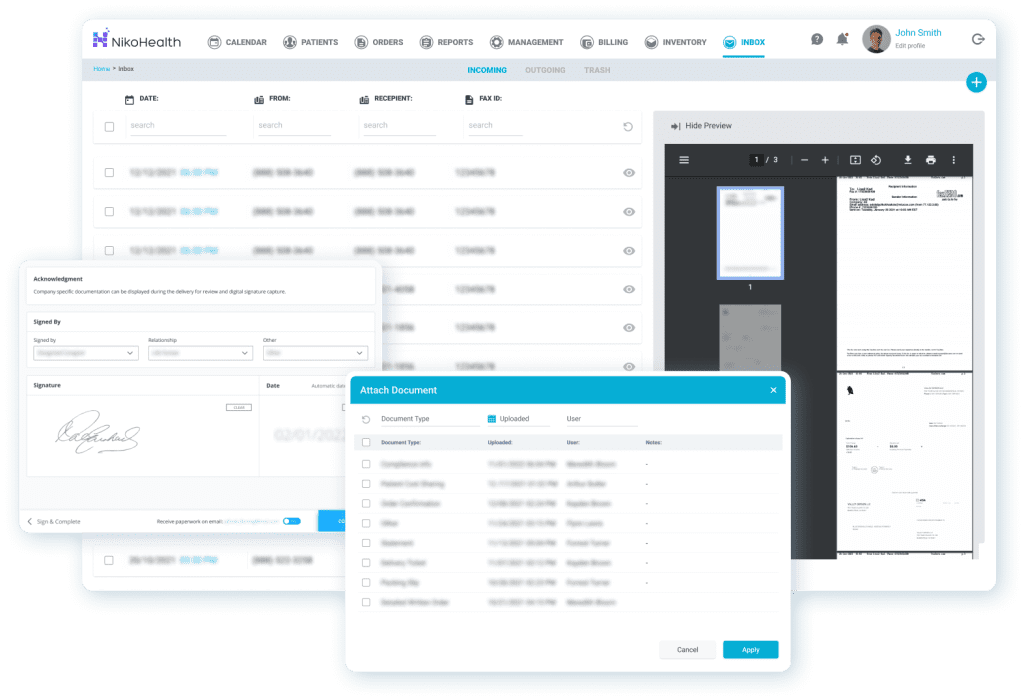
Managing DME documentation doesn’t have to be a headache. NikoHealth DME software digitizes and centralizes every document (from orders and prescriptions to authorizations and proof of delivery) so your team can access the right information in seconds.
With automated indexing, standardized naming, secure storage, and audit-ready organization, NikoHealth reduces errors, minimizes claim denials, and keeps your workflow compliant.
Want to see it in action? Book a free personalized demo!
Final Thoughts
A well‑designed document management workflow isn’t just about meeting CMS documentation rules, it’s about operational efficiency, reducing denials, passing audits, and building a more reliable revenue cycle. By integrating clear standards, automated tools, quality checkpoints, and ongoing training, your organization can turn documentation from a compliance burden into a strategic strength.
Think of your documentation system as your first line of defense in compliance, when it’s strong, everything downstream becomes easier: billing, auditing, payer relationships, and even patient communication.
DME Document Management Workflow FAQ
Why is a document management workflow important for DME suppliers?
A well-structured system ensures all required documentation — including orders, clinical notes, and proof of delivery — is captured accurately, organized, and easy to retrieve. This reduces claim denials, strengthens audit readiness, and ensures compliance with CMS DMEPOS standards.
What documents are required for DME claims?
Key documents include a valid written order (Standard Written Order or Written Order Prior to Delivery), clinical documentation supporting medical necessity, proof of delivery, and coding/billing support materials. Some items also require evidence of a face-to-face encounter.
How often should internal audits be conducted?
Suppliers should perform internal audits monthly or quarterly to monitor trends, identify documentation gaps, and ensure continuous compliance. Proactive auditing reduces the risk of denials and prepares suppliers for CMS or MAC audits.
Can a document management system help with compliance?
Yes. A good DMS centralizes all documentation, integrates with billing/EHR systems, tracks version history, and provides searchable indexing. This ensures records are audit-ready and reduces errors caused by misplaced or inconsistent files.
What are the most common mistakes in DME documentation workflows?
Common mistakes include inconsistent naming conventions, manual record-keeping without automation, missing or outdated documentation, and unclear staff responsibilities. These gaps can lead to claim denials, delays, and increased audit risk
How can suppliers ensure all staff follow the workflow consistently?
Regular training, clear role assignments, standardized checklists, and ongoing performance monitoring are essential. Staff should understand documentation requirements, proper use of the DMS, and coding standards to prevent errors.

With over a decade of experience in medical software and hardware support, Alan combines technical expertise with hands-on client collaboration to help organizations achieve successful implementations.

Related Articles