



What Is Prior Authorization for Durable Medical Equipment?
Prior authorization for durable medical equipment is a payer-required approval process that has to be completed before certain equipment is delivered to a patient and billed. Without a valid authorization number on file, the claim gets denied, even if the equipment is clearly medically necessary and the patient is covered.
It applies to a wide range of product categories: power wheelchairs, hospital beds, oxygen equipment, custom orthotics, and more. Which items require prior auth depends on the payer, the patient’s specific plan, and the HCPCS codes being billed. Medicare fee-for-service, Medicare Advantage, and commercial payers each have their own rules. and those rules change regularly. (If DME billing is an area your team is still building expertise in, it’s worth getting that foundation solid before tackling auth workflows specifically.)
How the DME Authorization Process Works
There’s a defined sequence to the DME authorization process. Understanding each step is how you identify where the delays are actually happening, which is almost always not where teams assume.
- Identify prior auth requirements. Before anything else, confirm whether the HCPCS code and payer combination actually needs prior authorization. This check should happen at intake, the moment the order is created and insurance is verified, not after a physician’s order has already been sitting for two weeks.
- Gather clinical documentation. Most payers need a physician’s order, a Certificate of Medical Necessity (CMN), supporting clinical notes, and often a record of a face-to-face exam. Requirements vary by payer, so a Humana Medicare Advantage plan may ask for something different than an Aetna commercial plan. This is exactly where DME coding accuracy matters — wrong HCPCS codes at this stage mean the auth you obtain won’t match the claim you submit.
- Submit the request. Submissions go to the payer’s prior authorization department by fax, web portal, or electronic transaction. Many payers still operate by fax. Others have moved to online portals or FHIR-based systems. Either way, incomplete submissions don’t come back for correction, they get denied.
- Track authorization status. This is where most providers lose time. Payers don’t proactively notify you when they need additional information. Someone on your team has to be checking portal status and following up on requests for information (RFIs). Without a structured process for this, requests stall indefinitely.
- Capture the authorization number. An approved prior auth comes with an authorization number and a validity window. That number has to make it into your billing system and onto the claim. One of the most common reasons DME claims get denied is a claim submitted with an expired or missing authorization number — usually because the approval came in by fax and no one logged it.
- Deliver within the authorization window. If delivery gets pushed outside the valid dates, you’ll need re-authorization before billing. For higher-cost items, that can mean another 10–14 day wait.
Medicare Prior Authorization for DME: What’s Actually Required
Medicare prior authorization DME requirements have expanded significantly in recent years. CMS implemented the Prior Authorization Process for Certain DMEPOS to address high utilization and fraud risk in specific equipment categories, and enforcement has tightened. If you haven’t reviewed the Medicare DME billing requirements lately, it’s worth doing. Prior auth rule changes often arrive as part of broader billing policy updates.
Under the program, a Provisional Affirmation from the applicable DME MAC must be obtained before submitting the claim for items on the CMS Master List — including power mobility devices and certain custom orthotics. Submit a claim without this affirmation and it’s an automatic denial with no appeal rights for the missing authorization.
A few things to keep in mind for Medicare prior auth submissions:
- Submit through the correct DME MAC for your jurisdiction (A, B, C, or D)
- Include all required documentation upfront — incomplete submissions don’t get a chance to correct themselves
- Provisional affirmations are valid for 90 days; reauthorization is required if delivery falls outside that window
- Expedited review is available within 72 hours when the standard timeline would put the patient’s health at risk — DME providers underuse this option more often than not
It’s also worth understanding that Medicare Advantage plans have their own prior auth requirements that often go beyond traditional Medicare. This is a common source of confusion, especially for teams that handle both. If your billing setup doesn’t account for plan-level differences, the DME compliance exposure adds up quickly.
Why Prior Auth Approvals Get Delayed
Here’s the honest reality: most prior auth delays are not the payer’s fault. They’re process problems on the provider side. The same documentation gaps and workflow failures show up at organizations of every size.
Root Cause | What It Looks Like in Practice |
Incomplete CMN | Missing physician signature, diagnosis codes that don’t match clinical notes, or outdated CMN templates that no longer meet current payer requirements |
Wrong HCPCS code | Prior auth was obtained for the right clinical need but the wrong billing code — so the claim goes out on a code the auth doesn’t cover |
Payer-specific gaps | Staff submit documentation that satisfies one payer’s standards but not another’s — triggering RFIs and re-submissions |
No status tracking | Auth requests sit in a payer queue unacknowledged for days because no one is proactively checking portal status |
Authorization number not captured | Approval arrives by fax and doesn’t get logged into the billing system — claim goes out without the required reference number |
Expiry not monitored | Authorization window closes before delivery is scheduled; equipment is delivered and billed against an expired auth |
How to Speed Up Prior Auth for Durable Medical Equipment
Speeding up prior auth isn’t about cutting corners. It’s about removing the friction from a process that’s already complex by design. These are the steps that actually move the needle.
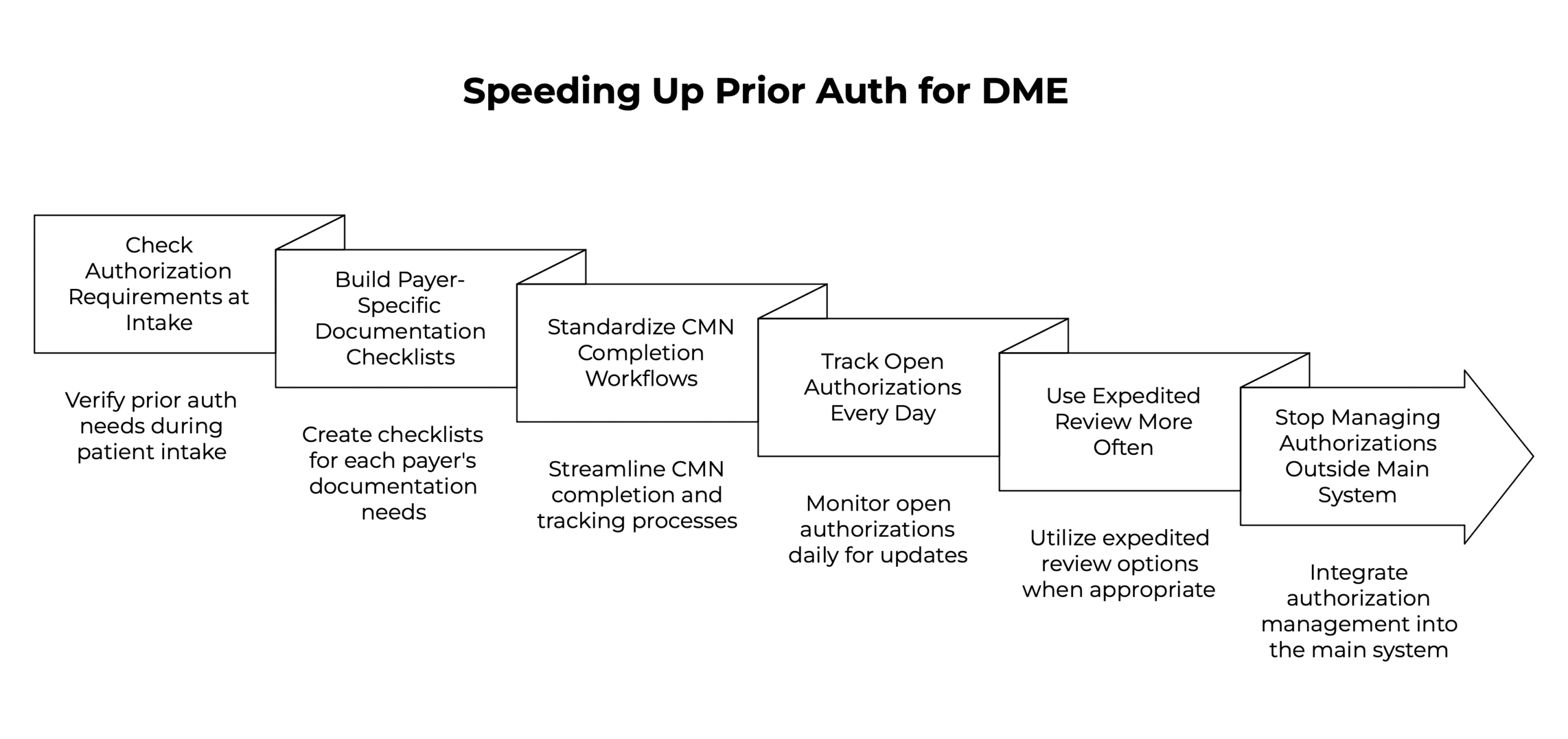
1. Check Authorization Requirements at Intake
The single biggest time-waster in the prior auth process is starting the documentation chase after the order is already placed. By then, clinical notes might be weeks old, the ordering physician is hard to reach, and the CMN request is sitting in a queue somewhere. Patient intake is the right moment to flag prior auth requirements, when insurance is being verified and the order is being built, not when it’s ready to ship.
2. Build Payer-Specific Documentation Checklists
Not every payer needs the same documentation. Building checklists tied to HCPCS code and payer prevents the back-and-forth of re-submissions. These checklists should be updated whenever a payer announces prior auth policy changes, which happens more often than most teams track. If your team is still managing this knowledge in people’s heads or shared inboxes, you’ll keep running into the same gaps.
3. Standardize CMN Completion Workflows
An unsigned or incomplete CMN is one of the most consistent reasons prior auth takes longer than it should. Build a structured workflow for requesting, tracking, and receiving CMNs from ordering physicians. Fewer fax cycles means faster turnaround. If your DME billing software supports physician portal access or electronic CMN completion, use it. Every manual touchpoint in the CMN process is a potential delay.
4. Track Open Authorizations Every Day
Payer portals don’t send notifications when additional information is needed. Without someone checking open authorizations daily and responding to RFIs within 24–48 hours, requests sit indefinitely. This is one area where RCM software built for DME makes a real operational difference — centralized auth tracking means your whole team can see what’s open, what’s approved, and what’s about to expire, without digging through fax queues.
5. Use Expedited Review More Often
Most payers, including Medicare, offer expedited prior authorization review when standard timelines would harm the patient. DME providers routinely underuse this option. A patient being discharged from the hospital who needs a hospital bed or oxygen concentrator at home almost always qualifies. Expedited requests turn around in 72 hours or less — compared to 10–14 days for standard review. If your clinical documentation supports urgency, use it.
6. Stop Managing Authorizations Outside Your Main System
Spreadsheets and shared inboxes are where authorizations get lost. When prior auth data lives outside your order and billing workflow, the handoffs create gaps — authorization numbers don’t get captured, expiry dates get missed, and claims go out with stale or missing auth references. The HME/DME features that matter most here are authorization tracking built directly into the order lifecycle: status visibility, expiry alerts, and automatic carry-through to the claim. That’s a very different experience from managing auth in a separate process.
If you’re evaluating whether your current setup is actually sufficient, the 8 must-have features for HME software guide covers what good looks like for authorization management specifically — along with the other seven areas that tend to break down when a platform wasn’t built for this.
How NikoHealth Supports the DME Prior Authorization Process
NikoHealth manages prior authorization as part of the full order lifecycle — not as a separate step that gets bolted on after intake. When an order is created, the platform checks eligibility and flags prior auth requirements based on payer and HCPCS code, giving your team lead time to gather documentation before the order is ready to ship.
Authorization status is visible across your team in real time. Expiry dates are tracked automatically. And when an authorization is approved, the number carries through to the claim — eliminating the manual logging step where approvals most often get missed. For providers dealing with high volumes of Medicare and Medicare Advantage orders, this kind of upstream visibility is what prevents the last-minute scrambles that delay delivery.
Teams that have moved to NikoHealth from legacy systems report fewer claim denials tied to authorization errors, specifically because the process is embedded in the order workflow rather than managed alongside it.
Frequently Asked Questions
What is prior authorization for durable medical equipment?
Prior authorization for durable medical equipment is a payer-required approval that must be in place before certain equipment is delivered to a patient and billed. The provider submits clinical documentation to the payer, the payer reviews it against coverage criteria, and issues an authorization number. Without that number on file, the claim is denied — regardless of medical necessity or coverage.
Which DME items require prior authorization under Medicare?
Medicare requires prior authorization for DMEPOS items on the CMS Master List, including power mobility devices, certain custom orthotics and prosthetics, and therapeutic shoes for diabetic patients. CMS updates this list periodically. Check the DME MAC portal for your jurisdiction before submitting. For a full overview of how Medicare covers DME, the Medicare DME billing guide covers this in detail.
How long does the DME prior authorization process take?
Standard prior auth review typically takes 5 to 14 business days depending on the payer and equipment category. Medicare DME MAC decisions generally come within 10 business days for standard requests. Expedited reviews (available when standard timelines would harm the patient) are processed within 72 hours by most payers, including Medicare.
What are the most common reasons DME prior authorization is denied?
The most frequent causes are incomplete or unsigned CMNs, diagnosis codes that don’t support medical necessity, incorrect HCPCS code selection, and submissions to the wrong payer department or portal. Most of these are overturned on appeal when correct documentation is resubmitted, but that cycle adds weeks to delivery. The DME claim denial guide covers this more extensively.
How can DME providers speed up the prior authorization process?
The most effective approach is a combination of: verifying auth requirements at intake (not at shipment), building payer-specific documentation checklists, tracking open authorizations daily, using expedited review whenever it applies, and managing authorization status within your DME software rather than in a parallel manual process. Each step individually helps, but together they eliminate most of the delays that are within your control.
Does Medicare Advantage require prior authorization for DME differently than Medicare fee-for-service?
Yes, and this catches a lot of providers off guard. Medicare Advantage plans set their own prior authorization requirements, which often go beyond traditional Medicare. A plan may require prior auth for equipment categories that fee-for-service doesn’t, and documentation standards can differ significantly by plan. Verify prior auth criteria for each Medicare Advantage payer separately. This is one of several areas covered in the broader DME compliance guide if you want more context on how payer-level rule management works in practice.
How does prior authorization relate to DME audits?
Missing or expired authorizations are one of the most common triggers for Medicare DME audit clawbacks. When auditors review a claim, they check that a valid authorization was in place at the time of delivery. If it wasn’t (or if the authorization number doesn’t match the billed item) the payment gets recouped. Strong prior auth documentation is as much an audit protection strategy as it is a billing efficiency one.

With over a decade of experience in medical software and hardware support, Alan combines technical expertise with hands-on client collaboration to help organizations achieve successful implementations.

Related Articles