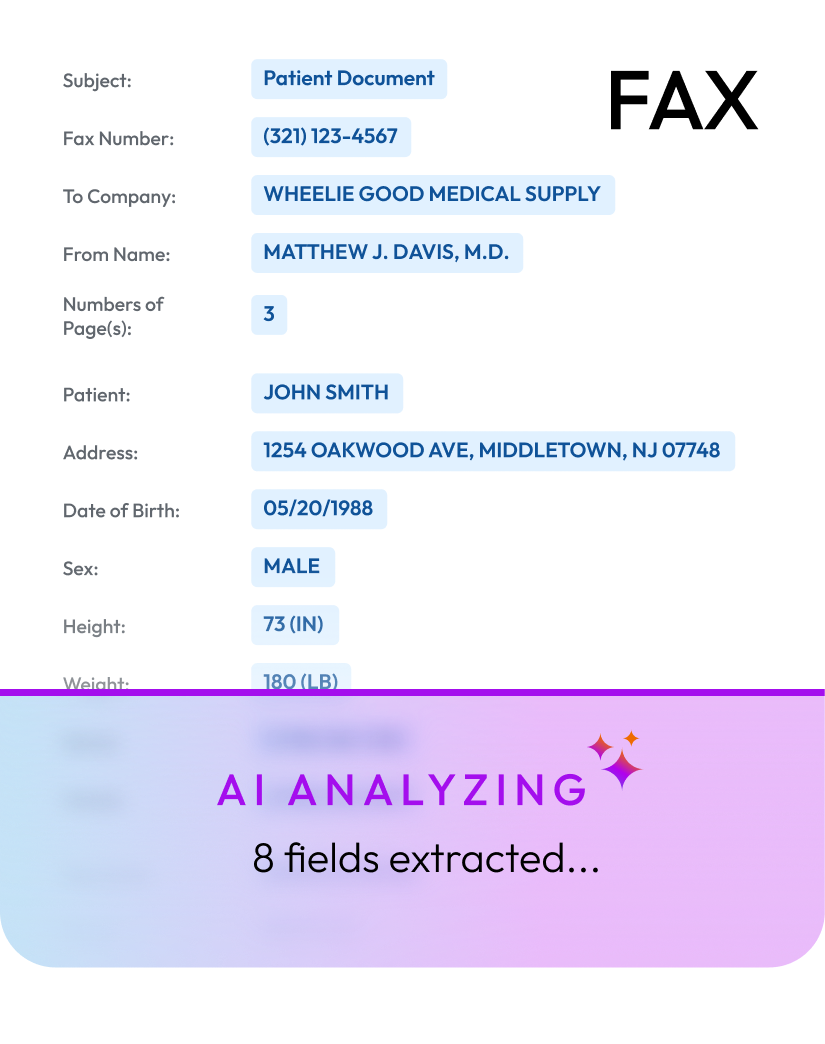
NikoHealth AI transforms your inbox by automatically analyzing incoming faxes, extracting key information, and completing manual data entry tasks — so your team processes documents faster, reduces administrative burden, and stays focused on patient care.





















NikoHealth AI transforms document intake from a manual process into an intelligent, automated workflow. Incoming faxes are read, classified, and turned into actionable information—reducing data entry, eliminating bottlenecks, accelerating processing, and enabling your team to handle more volume without adding operational overhead.
Each incoming document is identified by type on arrival — standard written orders, detailed written orders, proof of delivery, face-to-face notes, insurance cards, clinical notes, and prior authorization approvals. Nothing sits in a shared fax inbox waiting to be sorted by hand.
Multi-document faxes are split into individual, actionable records. A twelve-page packet becomes the four documents it actually contains, each attached where it belongs.
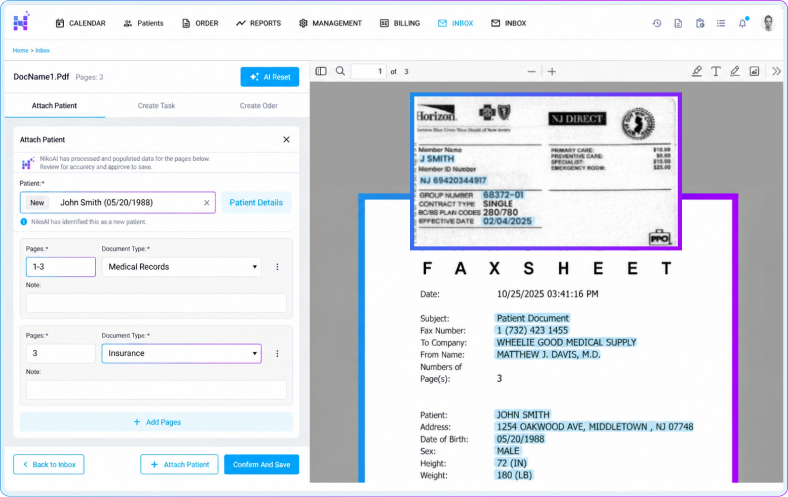
Patient demographics, insurance details, and relevant clinical information are captured automatically and written into the record. Your team confirms accuracy instead of transcribing fields from a scanned page.
Documents are matched to existing patient records where one exists. When no match is found, NikoHealth creates a complete new patient record in seconds, so duplicates stop accumulating in your database.
Address and location data is verified against authoritative sources during intake. Getting the delivery address right at the start of the order prevents failed deliveries and the rework that follows.
Insurance information is pulled from the document and eligibility is checked in real time. Coverage problems surface at intake, not after the equipment has already left the warehouse.
NikoHealth AI Intake Automation
NikoHealth AI transforms your inbox by automatically analyzing incoming faxes, extracting key information, and completing manual data entry tasks, allowing your team to process documents faster, reduce administrative burden, and stay focused on patient care.
Request a Demo70% less
Processing time
3.3× faster
Intake task completion
2,100+ hours
Reclaimed annually
Put a Number on the Impact
Show me the SavingsTell us about your fax volume
Two quick numbers — everything else calculates automatically.
faxes / month
3,000
hours won back per year
That’s 1.4 FTEs of intake capacity your team gets back for higher-value work.
$76,812
net savings per year
All-in annual cost
Today — manual process
$144,000
With NikoHealth AI
$67,188
How this is calculated
Your intake team shifts from manual data entry to reviewing, approving, and handling exceptions, which is where their expertise actually matters.
Incoming documents are automatically identified and classified by type.
Patient information is extracted, and a new patient record is created or matched to an existing one.
Address and location data is verified against authoritative sources.
Insurance information is pulled and real-time eligibility is run.
Orders are facilitated directly from the faxed prescription.
Built directly into the NikoHealth platform your team already uses.
Documents, automation, workflows, and operations work together in a single source of truth.
Nothing new to deploy, integrate, or manage.
Patient data and documents remain within one connected workflow.
Keeping client data secure is a top priority at NikoHealth. The platform is SOC 2 compliant, ISO 27001 certified, and HIPAA compliant, and runs on secure cloud infrastructure powered by Amazon Web Services (AWS).


































NikoHealth AI Document Automation transforms incoming faxes and documents into actionable workflows. AI automatically reads, classifies, extracts, and organizes information from documents, reducing the manual work required to review and enter data.
NikoHealth AI is designed to process common documents received by DME/HME providers, including prescriptions, medical records, insurance information, demographics, referrals, orders, and other supporting documentation.
Instead of requiring staff to open every fax, identify the document, locate relevant information, and manually enter it into the system, NikoHealth AI performs much of that work automatically and presents the results directly within the NikoHealth workflow for review.
NikoHealth uses a human-in-the-loop approach. AI-extracted information is presented to users for review and confirmation before applicable information is committed to the patient or workflow, helping teams maintain control over the process.
Yes. NikoHealth AI can use information contained within an incoming document to assist with matching it to the appropriate patient record and workflow, significantly reducing the effort required to route documents manually.
Savings depend on document volume, complexity, and your current processes. By reducing repetitive document review and data entry, NikoHealth AI can significantly increase the number of documents a team can process without a corresponding increase in staffing. Use our ROI Calculator to estimate the potential impact for your organization.
That’s one of the primary benefits. By automating high-volume, repetitive intake work, existing staff can spend less time processing documents and more time on exceptions, patients, and higher-value activities—allowing operations to support greater volume without increasing headcount at the same rate.
Yes. NikoHealth’s AI document workflows are designed for healthcare environments and operate within NikoHealth’s security and compliance framework, with controls designed to protect sensitive patient information throughout processing.
No. AI Document Automation is integrated into NikoHealth, allowing documents, extracted information, patient matching, and review workflows to remain connected to the operational workflows your team already uses.
NikoHealth can work with your organization to evaluate current document volume and intake workflows, identify automation opportunities, and estimate the potential operational and financial impact of AI-powered document processing.